Claim & Foreclosure Lifecycle
To understand foreclosure, it helps to first see how an application's inputs turn into settled state, and where foreclosure fits in. This page walks through that lifecycle.
From inputs to a settled claim
Inputs. A user action (a deposit through a portal, or a message sent to the app) becomes an input, recorded on-chain in the InputBox.
Epochs. Inputs are not settled one at a time. They are grouped into epochs: batches of consecutive inputs that are settled together as a single claim. Every input belongs to exactly one epoch. How epoch boundaries are drawn depends on the consensus; under Authority and Quorum an epoch covers a range of blocks, set by the consensus epochLength.
Claims. The application runs as a deterministic Cartesi Machine. The node feeds each input to the machine as it arrives, advancing the machine's state and producing outputs. When the epoch closes, the node reduces the resulting state to a single fingerprint, a claim (a Merkle root), and posts it on-chain so the consensus contract can trust the off-chain computation by verifying one hash.
Posting a claim happens in two transactions:
- Submit (
submitClaim) posts the claim. The epoch becomesCLAIM_STAGED. - Accept (
acceptClaim) finalizes it, once a waiting period has passed. The epoch becomesCLAIM_ACCEPTED.
The waiting period between the two is the claim staging period, measured in blocks and fixed when the consensus is deployed. The consensus contract enforces it: acceptClaim reverts until enough blocks have passed. A staging period of 0 lets acceptance happen right away.
The epoch status flow
An epoch moves through these statuses:
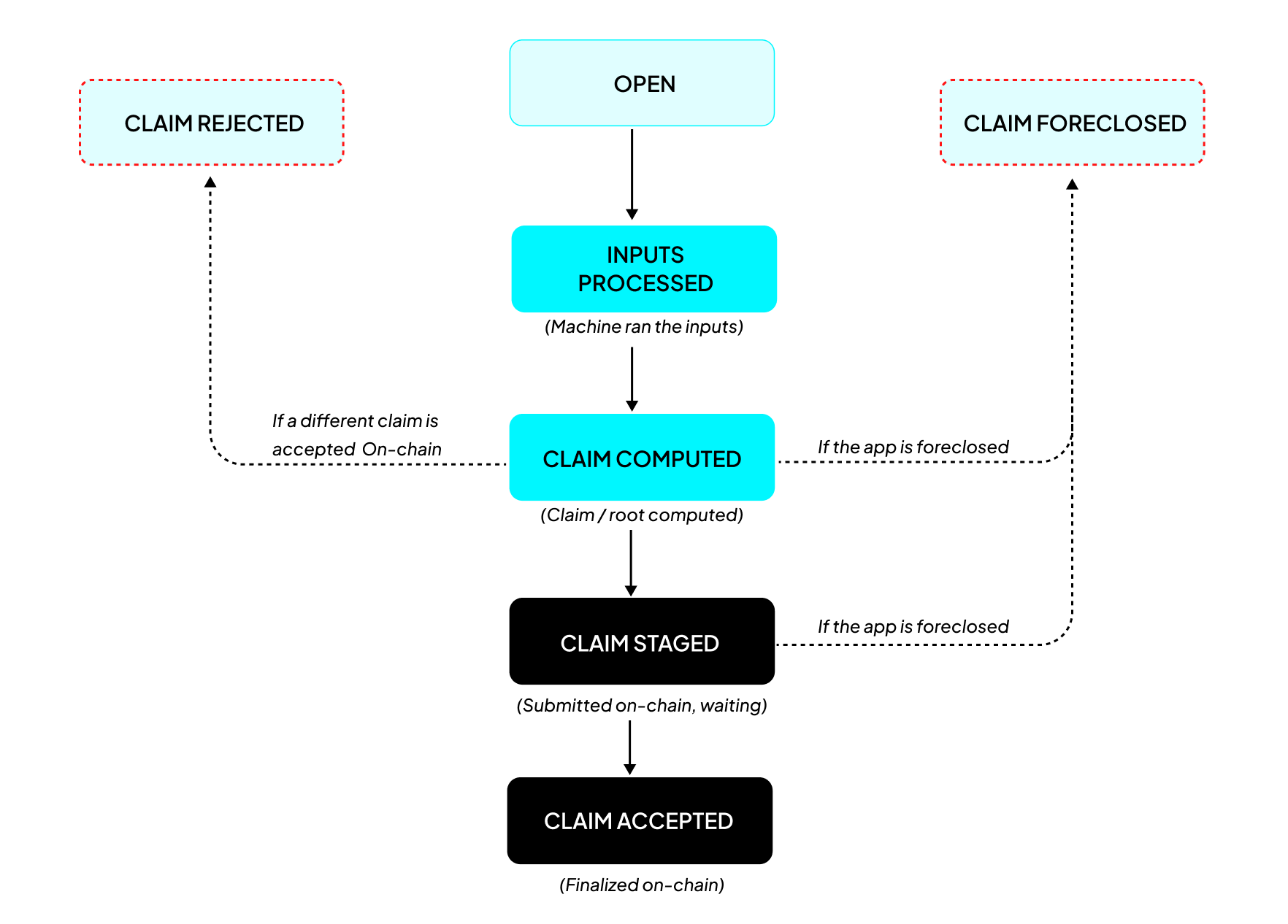
- OPEN: the epoch's block range is still current and collecting inputs.
- INPUTS_PROCESSED: the epoch has closed and the machine has processed all of its inputs.
- CLAIM_COMPUTED: the node has the claim ready.
- CLAIM_STAGED: the claim was submitted on-chain and is in its staging window.
- CLAIM_ACCEPTED: the staging period elapsed and the claim was finalized. This is the settled state that outputs (and emergency withdrawal) rely on.
- CLAIM_FORECLOSED: a terminal status a claim reaches if the application is foreclosed before that claim finalizes (see below).
- CLAIM_REJECTED: this is a related terminal status, but a node-level one rather than an on-chain outcome. The node marks its own epoch
CLAIM_REJECTED(and the applicationDIVERGED) when it observes that a claim different from the one it computed was accepted on-chain, for example on a Quorum where another validator's claim won the vote.
Foreclosure
Everything above assumes the operator keeps running the node and the application operates in optimum condition. Foreclosure is what happens when you can no longer depend on that.
Foreclosure is the act of permanently freezing a Cartesi Rollups application at its last accepted state, this process can be triggered in situations where; the operator abandons the application, a bug is discovered in the application code, a compromised authority, a dishonest quorum majority, or a false claim is left unchallenged in a PRT dispute tournament.
The claim staging period is the guardian's window to act: foreclosing before such a claim is accepted terminalizes it as CLAIM_FORECLOSED and freezes the application on the last state it still trusts, so users withdraw against that state and not the bad one. It's important to note that, Foreclosure does not reverse a claim that has already been accepted; once a state is accepted it is what emergency withdrawals pay out from, which is why the guardian's protection depends on acting within the staging window.
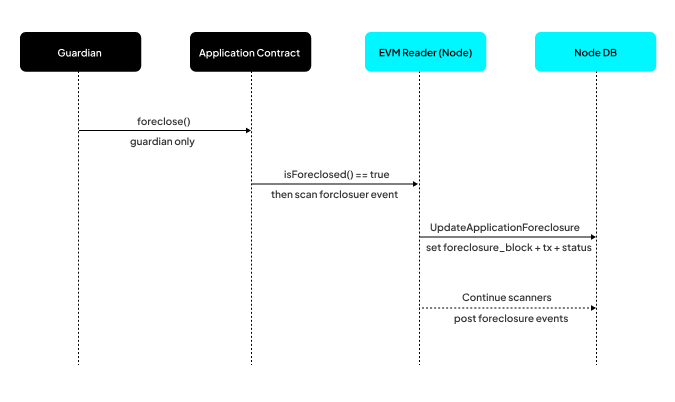
To forclose an application, the guardian, a single address fixed in the withdrawal config, calls foreclose() on the application contract. isForeclosed() becomes true and this permanently freezes the application:
A foreclosed application can no longer process inputs. Once frozen it takes on no new inputs and settles no new state. The one procedure it can still run is emergency withdrawal: returning the assets users already deposited back to them, directly from the contracts.
Foreclosure is a property of the application contract and of the node. It takes both to make the freeze permanent:
- The contract holds the on-chain truth.
foreclose()can only be called by the guardian and setsisForeclosed(), after which the normalsubmitClaimandacceptClaimpaths revert. The contract also gates emergency withdrawal so that path only opens once the application is foreclosed. - The node observes that truth and acts on it. Its EVM Reader detects the on-chain
Foreclosureevent, records it in the node database, and stops claiming new inputs for that application, however it still keeps watching the base layer so as to index subsequent emergency withdrawals. The node also generates the accounts-drive proofs users need to withdraw.
Foreclosure has three effects on claims:
- Accepted history is kept. An epoch that already reached
CLAIM_ACCEPTEDstays accepted. Foreclosure does not rewrite settled history. - In-flight claims are cancelled. A claim that has not finalized cannot finalize once the operator's authority is frozen, so the node marks it terminal as
CLAIM_FORECLOSEDinstead of leaving it stuck. This happens whether the claim was still pre-staging (CLAIM_COMPUTED) or alreadyCLAIM_STAGED. - The state is frozen. The application settles at its last accepted epoch, a final state that anyone can reproduce on their own.
After foreclosure: prove and withdraw
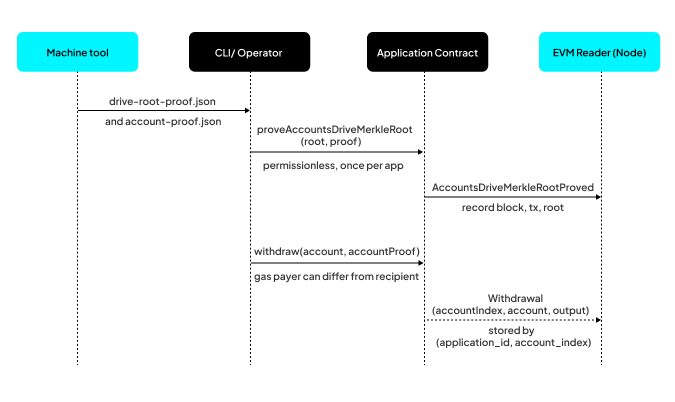
Once frozen, the accounts drive (the in-app balance ledger inside the machine state) at the last accepted epoch is the source of truth for balances. Turning that into on-chain payouts takes three steps, one off-chain and two on-chain:
- Generate the proofs. Off-chain, anyone runs the machine tool (
cartesi-rollups-machine-tool) to replay the settled machine state and thenprove accounts-drive. Replay is deterministic, so anyone can reproduce the last accepted state independently, with no running node. This writes two proof files:drive-root-proof.json(the accounts-drive root and its proof against the machine state, used once in step 2) andaccount-proof.json(the per-account Merkle proofs, used in step 3). - Anchor the ledger. Anyone calls
proveAccountsDriveMerkleRoot()once, passing the root and proof fromdrive-root-proof.json. The contract checks it against the settled machine state and stores it. This is permissionless and happens once per application. - Withdraw per account. Each account is withdrawn with
withdraw(), passing the account and its Merkle proof fromaccount-proof.json. The contract validates the account against the anchored root, builds a transfer output, runs it, and marks the account as withdrawn so it cannot be withdrawn twice. The gas payer can differ from the recipient.
As each on-chain step lands, the node's EVM Reader indexes it: it records the AccountsDriveMerkleRootProved event when the ledger is anchored, and stores each Withdrawal event (keyed by application and account index) so clients can read withdrawals over JSON-RPC and the CLI.